



WfCommons is an open-source Python framework for enabling scientific workflow research and development. It provides, in a single package, everything needed to go from real workflow executions to realistic synthetic workflows and runnable benchmarks: parsers that turn execution logs into a common format, analysis tools that characterize workflow behavior, generators that produce synthetic workflows at any scale, and translators that emit executable benchmarks for a dozen workflow systems.
Quick links: Documentation · Website · GitHub
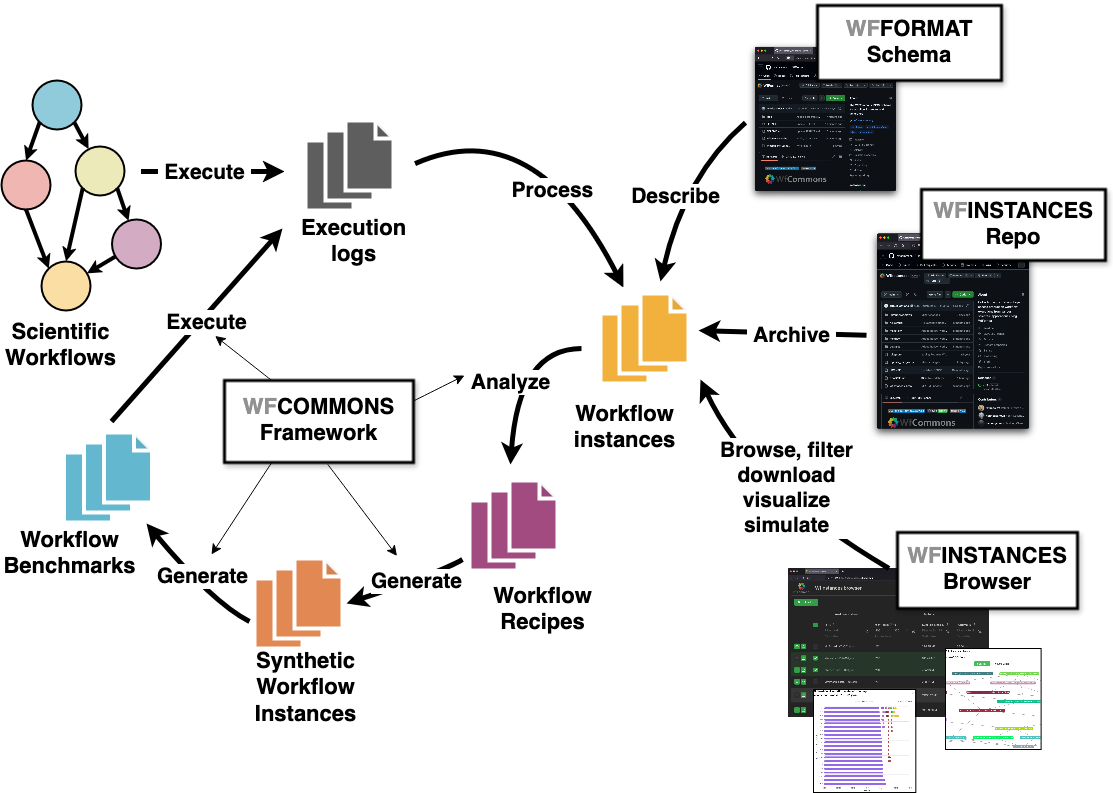
The WfCommons conceptual architecture.
Why WfCommons?
Research on workflow scheduling, resource provisioning, and system design needs workflows to experiment with — many more than any single team can obtain from production systems. WfCommons solves this problem end-to-end: it curates real execution instances in an open format (WfFormat), learns their structural and statistical properties, and reproduces them synthetically at arbitrary scales — so experiments are realistic, repeatable, and comparable across studies.
The framework
A curated, open-access collection of production workflow executions in a common JSON format, plus parsers that build instances from the logs of Makeflow, Nextflow, Pegasus, Snakemake, TaskVine, and more.
Automatically discovers the recurring subgraph patterns and statistical task profiles of a workflow application and packages them as a reusable recipe — no manual modeling required.
Turns a recipe into any number of realistic synthetic workflow instances with an arbitrary number of tasks — including scaled runtimes and data sizes for what-if experiments.
Generates workflow benchmarks with tunable CPU, memory, and I/O behavior, and translates them into executable code for Airflow, Dask, Nextflow, Parsl, Pegasus, TaskVine, and other systems.
All components speak WfFormat, an open JSON schema for describing workflow executions. Simulators that support WfFormat (e.g., WRENCH) can consume real and synthetic instances interchangeably — this is the WfSim part of the ecosystem.
Get started in 30 seconds
$ python3 -m pip install wfcommons
Generate a realistic 250-task Seismology workflow:
import pathlib
from wfcommons.wfchef.recipes import SeismologyRecipe
from wfcommons import WorkflowGenerator

generator = WorkflowGenerator(SeismologyRecipe.from_num_tasks(250))
workflow = generator.build_workflow()
workflow.write_json(pathlib.Path("seismology-workflow.json"))
Where to go next:
Quickstart — installation and first steps.
The WfCommons Project — how the components fit together, and WfFormat.
WfInstances: Workflow Instances — parse execution logs and analyze real instances.
WfChef: Workflow Recipes — build recipes from your own workflows.
WfGen: Generating Workflows — generate synthetic workflows at scale.
WfBench: Workflow Benchmarks — produce runnable benchmarks.
Citing WfCommons
When citing WfCommons, please use the following paper (it also provides a general overview of the framework):
@article{wfcommons,
    title = {{WfCommons: A Framework for Enabling Scientific Workflow Research and Development}},
    author = {Coleman, Taina and Casanova, Henri and Pottier, Loic and
              Kaushik, Manav and Deelman, Ewa and Ferreira da Silva, Rafael},
    journal = {Future Generation Computer Systems},
    volume = {128},
    pages = {16--27},
    doi = {10.1016/j.future.2021.09.043},
    year = {2022},
}
Support
The source code for the WfCommons Python package is available on GitHub. Our preferred channel to report a bug or request a feature is via WfCommons’s GitHub Issues Track.
You can also reach the WfCommons team via our support email: support@wfcommons.org.